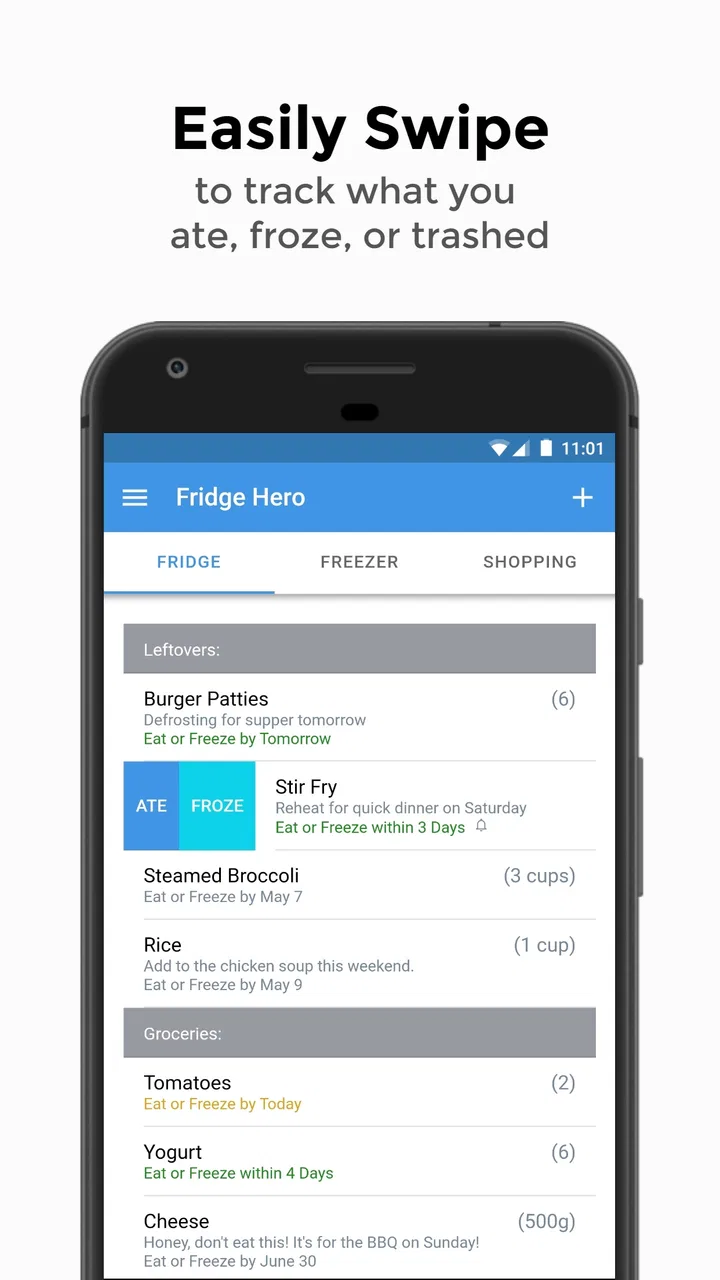
Fridge Hero: Track Leftovers
- 3.6
- Rating
- 10.00K
- Installs
- Free
- Price

 Analysis by App-foxy
I usually notice food waste in small, irritating moments: a container pushed behind the milk, vegetables forgotten in a drawer, or leftovers that look questionable because I cannot remember when they were cooked. Fridge Hero: Track Leftovers takes aim at that everyday problem by turning a pantry, freezer, and fridge into a simple inventory to check before shopping or cooking. I tested it as a food and drink app rather than treating it like a full meal planner, and that distinction matters. Its value depends less on excitement than on whether it becomes part of the routine.
The app comes from Jurasco Inc. and is free to install, with optional in-app purchases listed at $9.49 per item. It is rated for Everyone, runs on Android 7.0 or later, and its current version is 1.9.4. With an average rating of 3.6 from around 90 ratings, it has a modest but visible user base, reaching over 10 thousand installs. Those figures suggest a practical niche rather than a dominant household name, so I approached it with realistic expectations: this is meant to help you remember food, not replace your shopping judgment.
Why the first week feels useful
The strongest early impression is that Fridge Hero gives forgotten food a visible place in your routine. Instead of relying on memory, I can record what is in the kitchen and check it before deciding what to buy. That is especially helpful when several people share a fridge, because the person doing the shopping may not be the person who cooked the leftovers. A quick inventory can prevent the familiar “we already have that” purchase.
You May Also Like

 AccuWeather: Weather Radar
AccuWeather Review: A Quick, Clear Forecast for Everyday Decisions
For everyday plans, the best forecast is the one you can understand quickly. AccuWeather makes rain timing, radar, and local conditions easy to act on, with a few trade-offs.

 Hill Climb Racing
Why Hill Climb Racing Still Turns Crashes Into One More Run
A tiny car, a bumpy hill and one more upgrade: Hill Climb Racing keeps resurfacing because its simple chaos makes every near-miss feel personal.

 AliExpress - Shopping App
AliExpress Makes Global Shopping Feel Personal, but Shoppers Bear the Risk
AliExpress turns a global marketplace into a pocket-sized discovery engine. Its reach is useful, its shopping loop compelling, and its trade-offs easy to miss.

 Lords Mobile: Kingdom Wars
Lords Mobile Is a Kingdom-Building Routine, Not a Quick Match
A case-by-case verdict on the building, battles, device demands, and social commitments that make Lords Mobile rewarding for some players and exhausting for others.

 PDF Scanner app - TapScanner
TapScanner Makes Paperwork Easier to Capture, Check, and Share
TapScanner makes scanning with a phone feel less like a rescue operation and more like a dependable step in getting work done. Its capture tools are useful, though not flawless.

 Block Blast!
 Shows How Much a Puzzle Game Can Leave Out
A quiet grid game shows why puzzle players increasingly value instant clarity, repeatable skill and low-pressure play—and where the genre still needs to catch up.
More From Our News Desk
View All News


The app’s focus on expiry dates is also more practical than a generic notes app. A note saying “chicken” is not enough; I need to know whether it is raw, cooked, opened, or intended for the freezer. Recording an item alongside its date encourages a more useful decision: eat it soon, move it to the freezer, or leave it for later. I found that the date itself is not the whole answer, but it is a valuable prompt to inspect the food instead of forgetting it entirely.
My preferred first-week workflow would be to start with the food most likely to disappear from memory: leftovers, opened packages, and freezer containers. Trying to document every spice, can, and condiment immediately creates unnecessary work. A smaller starting list makes the app feel manageable and shows its benefit sooner. Once the habit is established, adding longer-lasting pantry items becomes more worthwhile.
That staged approach is one of the app’s less obvious strengths. A complete inventory sounds impressive, but a perfectly catalogued kitchen is not necessary for the app to help. The real win is catching the items that are easy to overlook. If I enter a container of soup when I put it in the fridge, I have a much better chance of using it during the next few meals.
A realistic kitchen scenario
Imagine coming home late before a grocery trip. Without an inventory, I might buy ingredients for pasta, overlook the cooked rice already in the fridge, and leave a half-used package of vegetables untouched. With Fridge Hero, I can check the recorded items first, identify what needs attention, and shape dinner around food that is already available. It does not invent a recipe or make the decision for me, but it reduces the mental effort involved in remembering what I own.
The same workflow helps after a large grocery shop. I can put new food into its actual storage area rather than treating the kitchen as one undifferentiated list. That matters because freezer items are easy to forget, pantry goods are often bought in duplicates, and fridge leftovers usually have the shortest practical window. Separating those situations makes the inventory more useful than a single shopping checklist.
The best first-week strategy is to track food that has a short memory, not food that has a long shelf life. That means cooked meals, opened dairy, cut produce, and anything moved into a container. This keeps the app from becoming a second job while still addressing the waste that most people actually notice.
What it does better than ordinary notes
A notes app is quicker for typing a few lines, and a paper list can work perfectly well for someone who shops every day. Fridge Hero earns its place by giving the inventory a food-specific purpose. The idea is not merely to write down objects; it is to connect what is stored with when it should be checked. That makes it more actionable than a loose note that gradually becomes outdated.
It also sits between two common alternatives. A shopping-list app is designed around what I need to buy, while this app is concerned with what I already have and what may need attention. A meal-planning service starts with recipes and schedules, whereas Fridge Hero starts with the contents of the kitchen. For someone whose main problem is forgotten food rather than deciding what to cook, that narrower focus is a good fit.
There is a trade-off, though. A specialized inventory only helps when I keep it current. A paper list can be crossed out instantly, and a general note may be less structured but faster to edit. The app’s advantage appears after several entries, when the information becomes a usable picture of the fridge rather than a single reminder.
What remains valuable after the novelty fades
I find that the lasting value of a food inventory depends on whether it helps me make one better choice at a time, not whether every shelf is perfectly recorded. In this section, I look at how a small, repeatable check can keep the routine useful without making kitchen organization feel like a chore.
Month-to-month value comes from repeated checks
After the first week, the novelty of entering food naturally wears off. That is not a flaw unique to this app; inventory tools live or die by maintenance. The lasting question is whether checking the list changes my behavior. In my experience, it can, particularly before grocery shopping and before throwing together a meal from whatever is available.
The recurring value is strongest for households that regularly cook in batches. If I prepare several portions at once, the leftovers are easy to lose track of because they look similar and may be stored in different containers. Recording them gives me a reason to look at those portions before opening something new. It is also useful for people who rotate between a fridge and a freezer, where food can remain technically available but practically invisible.
People with dietary routines may find a different benefit. Someone preparing lunches for work can check the inventory the night before and decide what needs to be packed. A parent can review stored food before buying another version of the same snack. A person living alone can use it to avoid cooking more than necessary when older leftovers are still waiting. These are modest improvements, but they repeat often enough to matter.
I would not expect the app to save money automatically. It can expose duplicate purchases and forgotten ingredients, but the result depends on whether I act on what I see. If I keep buying impulsively or ignore dates, the inventory becomes a record of waste rather than a solution to it. The app is most effective as a decision prompt, not as an automatic household manager.
How to keep the inventory useful
The most reliable habit is to update the app at natural transition points. When leftovers go into a container, record them then. When an opened item returns to the fridge, update its status or date at that moment. When a freezer item is moved out, remove or revise it before closing the door. Waiting until the end of the week creates a memory exercise, and memory is exactly the problem this kind of tool is meant to reduce.
I also recommend treating the shopping trip as a review rather than the main data-entry session. Before leaving home, scan the inventory and decide what should be used first. After returning, add only the new food that is genuinely easy to forget. This two-part routine keeps the app connected to real decisions instead of turning it into a catalog that nobody consults.
Another useful compromise is to record a broad item name when speed matters, then make it more specific only when the distinction affects a decision. “Cooked curry” is more helpful than “food,” but there is no need to describe every ingredient if the meal will be eaten soon. For freezer storage, more detail is worthwhile because the item may disappear from attention for much longer.
That approach reveals a central trade-off: detailed entries are more informative, but they are also more tiring. The right level is the least detail that lets me recognize the food and judge what to do with it. Anyone expecting a fully automated inventory may be disappointed, because the app still depends on deliberate input.
The maintenance burden is manageable, not invisible
Fridge Hero is not a set-and-forget tool. Food gets eaten, moved, shared, frozen, opened, and discarded. Every one of those changes can make an old entry misleading. If I fail to remove items, the app may suggest a kitchen that no longer exists. That is the main practical limitation, and it becomes more noticeable in a busy household where several people change the contents without updating the list.
For one person or a highly coordinated couple, maintenance can be reasonable. For a family that does not agree on one tracking routine, the burden rises quickly. A single person may know when leftovers were made, while another person may only see an unnamed container. The app cannot solve that communication problem by itself. Clear labels in the real fridge still matter.
The best way to reduce friction is to make the inventory selective. I would not record every bottle of water or every shelf-stable item that is always easy to see. I would prioritize food with a short useful life, food stored out of sight, and food bought in duplicate. That keeps maintenance focused on the areas where forgetting has a real cost.
There is also a psychological burden. Seeing an old item in a list can create guilt rather than action, especially when the food is no longer safe or appealing. I found it more useful to treat the inventory as a neutral prompt: inspect the item, make a sensible choice, and remove it if it is no longer usable. An app can support a better routine, but it should not encourage risky decisions simply to keep the list looking complete.
Where fatigue begins
The first source of fatigue is repeated entry. Adding one leftover feels easy; adding several ingredients after a large cooking session feels less appealing. The second is correction. If a date changes because food was frozen or opened later than expected, the entry needs attention again. The third is social: the system works poorly when only one household member remembers to maintain it.
Another source of tiredness is the gap between tracking and acting. I may know that vegetables should be used soon and still choose an easier meal. If that happens repeatedly, the app can begin to feel like another reminder that I am ignoring. Its value is higher when I pair the check with a concrete action, such as planning one meal around the oldest suitable item.
People who prefer automation may also find the experience too hands-on. A barcode-centered workflow, a shared household system, or a recipe planner may be better for someone who wants shopping and meals connected automatically. Fridge Hero’s narrower purpose is helpful when I want a clear food inventory, but it is not the strongest choice for someone seeking an all-in-one kitchen platform.
The optional purchase price of $9.49 per item also deserves a practical question: will the extra value justify paying for it? Since the basic app is free, I would first use the no-cost experience long enough to see whether the household actually maintains the inventory. Paying before establishing that habit would be backwards. If the routine fails, an additional purchase will not fix the underlying problem.
Who should use it, and who should skip it
I would recommend Fridge Hero to people who frequently forget leftovers, freeze food and lose track of it, or shop without knowing what is already at home. It is particularly suitable for someone who wants a focused food inventory rather than recipes, calorie tracking, or a broad household organizer. The Everyone rating also makes it approachable for ordinary family use, provided everyone understands the update routine.
I would be more cautious for people who shop daily, keep a very small amount of food, or already maintain a reliable paper system. In those situations, entering items may take longer than simply looking in the fridge. It may also be a poor match for households that need multiple people to edit the same information but cannot agree on who is responsible for updates.
It is also not the right choice if the main goal is meal inspiration. The app can help me notice ingredients and leftovers, but it does not replace a recipe service. Likewise, someone looking primarily for a supermarket shopping list may prefer a dedicated list app. The useful comparison is not that one tool is universally better; it is that Fridge Hero addresses the “what do I already have?” problem while other tools address “what should I buy?” or “what should I cook?”
My long-term verdict
Fridge Hero: Track Leftovers earns lasting space only when I use it as a small checkpoint, not as a perfect record of the entire kitchen. Its first-week appeal is clear: it gives dates and stored food a place where I can review them before shopping or cooking. Its month-to-month value comes from repeated decisions, especially using leftovers and remembering freezer items. But the same strength creates its weakness, because every useful entry eventually needs updating.
I like the app’s focused role in the Food & Drink category. It does not try to turn food storage into a complicated planning system. The free entry point makes it reasonable to test, and the current version, 1.9.4, gives users a straightforward way to see whether the routine fits their household. My recommendation is to begin with a small group of high-risk items, use it before grocery trips, and expand only if the habit survives a few ordinary weeks.
My honest recommendation: keep it if it changes what you eat, buy, or freeze; remove it if it only becomes another list to maintain. That is the lasting test. For a person who repeatedly discovers forgotten containers and duplicate groceries, the app can provide enough recurring value to justify the attention. For someone with a naturally visible, low-stock kitchen, a simple note or memory may remain faster. Fridge Hero is useful, but its success comes from disciplined, selective use rather than novelty.
FAQs for Fridge Hero: Track Leftovers
01What is Fridge Hero: Track Leftovers used for?
Fridge Hero: Track Leftovers is designed to help you organize food stored in your refrigerator, freezer, and pantry. You can record items, monitor quantities, check expiration dates, and receive reminders before food is likely to go bad. It is especially useful for households that want to reduce forgotten leftovers, plan meals more efficiently, and avoid unnecessary grocery purchases caused by poor kitchen organization.
02How does Fridge Hero help prevent food waste?
The app helps prevent food waste by giving you a clear overview of what you already have at home and which items should be used first. After adding leftovers or packaged foods, you can follow their storage dates and expiration information. Reminders make it easier to notice food before it is forgotten, although the app cannot determine freshness or guarantee that food is safe to eat.
03Do I have to enter every food item manually?
Fridge Hero may require some initial effort because the usefulness of its inventory depends on the information you add. Depending on the version and available features, items can generally be entered individually and organized by storage location or category. Users who regularly update quantities, dates, and leftovers will get better results than those who only add food occasionally.
04Can Fridge Hero: Track Leftovers be used for meal planning?
Yes, the app can support meal planning by showing ingredients and leftovers that are already available in your kitchen. This can help you decide what to cook before buying more groceries and encourage you to use foods approaching their best-before dates. However, it should be viewed primarily as an inventory and reminder tool, rather than a complete recipe or nutritional-planning service.
05Is Fridge Hero a replacement for checking food safety?
No. Fridge Hero can remind you about dates and help you keep track of stored food, but it cannot inspect smell, texture, temperature history, contamination, or spoilage. You should always follow official food-storage guidance, keep your refrigerator at a safe temperature, and use your own judgment before eating anything. When in doubt about a leftover or expired product, it is safer to discard it.
Pros
- Quickly logs leftovers to reduce food waste.
- Expiry reminders help prioritize what to eat first.
- Simple interface makes pantry tracking approachable.
- Useful search and sorting for finding stored items.
- Supports more organized grocery planning.
Cons
- Manual entry can become tedious after large shopping trips.
- Reminder accuracy depends on entering dates correctly.
- Limited value if household members do not update items.
- May require frequent notifications to stay useful.
- Food tracking can feel excessive for very small households.

Fridge Hero: Track Leftovers
Gallery